
9.6 KiB
Satisfactory
Where is the settings page?
The player settings page for this game contains all the options you need to configure and export a config file.
⚠ Pre-Release Note: The above link does not work because it would go to the live Archipelago site. Manually construct a yaml yourself from the one pinned in the Discord: https://discord.com/channels/731205301247803413/1018853131859267656
What does randomization do to this game?
In Satisfactory, the HUB Milestones and MAM Research Nodes are shuffled, causing technologies to be obtained in a non-standard order. The costs of unlocking these technologies are also shuffled. There are also a few new purchases in the AWESOME Shop. An alternate recipe you've never used before may end up required to progress, for example.
What is the goal of Satisfactory?
The player can choose from a number of goals using their YAML settings:
- Complete a certain Space Elevator tier
- Supply items to the AWESOME Sink totalling a configurable amount of points to finish.
In the current implementation, selecting multiple goals requires completion of any one goal to complete the slot.
What Satisfactory items can appear in other players' worlds?
Satisfactory's technologies are removed from the HUB and MAM and placed into other players' worlds. When those technologies are found, they are sent back to Satisfactory along with, optionally, free samples of those technologies.
Other players' worlds may have Resource Bundles of building materials, equipment, ammunition, or FICSIT Coupons. They may also contain Traps.
What is a Free Sample?
A free sample is a package of items in Satisfactory granted in addition to a technology received from another world. For equipment and component crafting recipes, this is the output product. For buildings, this is the ingredients for the building. For example, receiving the Nobelisk Detonator MAM Node would give you one Nobelisk Detonator and 50 Nobelisk, receiving the Jump Pads Milestone would give you the ingredients to construct 5 Jump Pads and 5 U-Jelly Landing Pads, etc. In Satisfactory multiplayer, each Satisfactory player gets a copy of the sample.
You can separately configure how many samples to receive for buildings, equipment, and crafting components in your player settings.
What is a Resource Bundle?
A resource bundle is a package of items received as a check from another world.
They must be collected by constructing an Archipelago Portal.
For example, Bundle: Jetpack would contain a single jetpack.
What does another world's item look like in Satisfactory?
In Satisfactory, items which need to be sent to other worlds appear in the HUB and MAM as info cards in a similar manner to the base game's building and recipe unlocks. Info cards have the Archipelago icon and are color coded to indicate what Archipelago progression type they are.
Hover over them to read a description, since many Satisfactory UIs (such as the MAM) cut this information off.
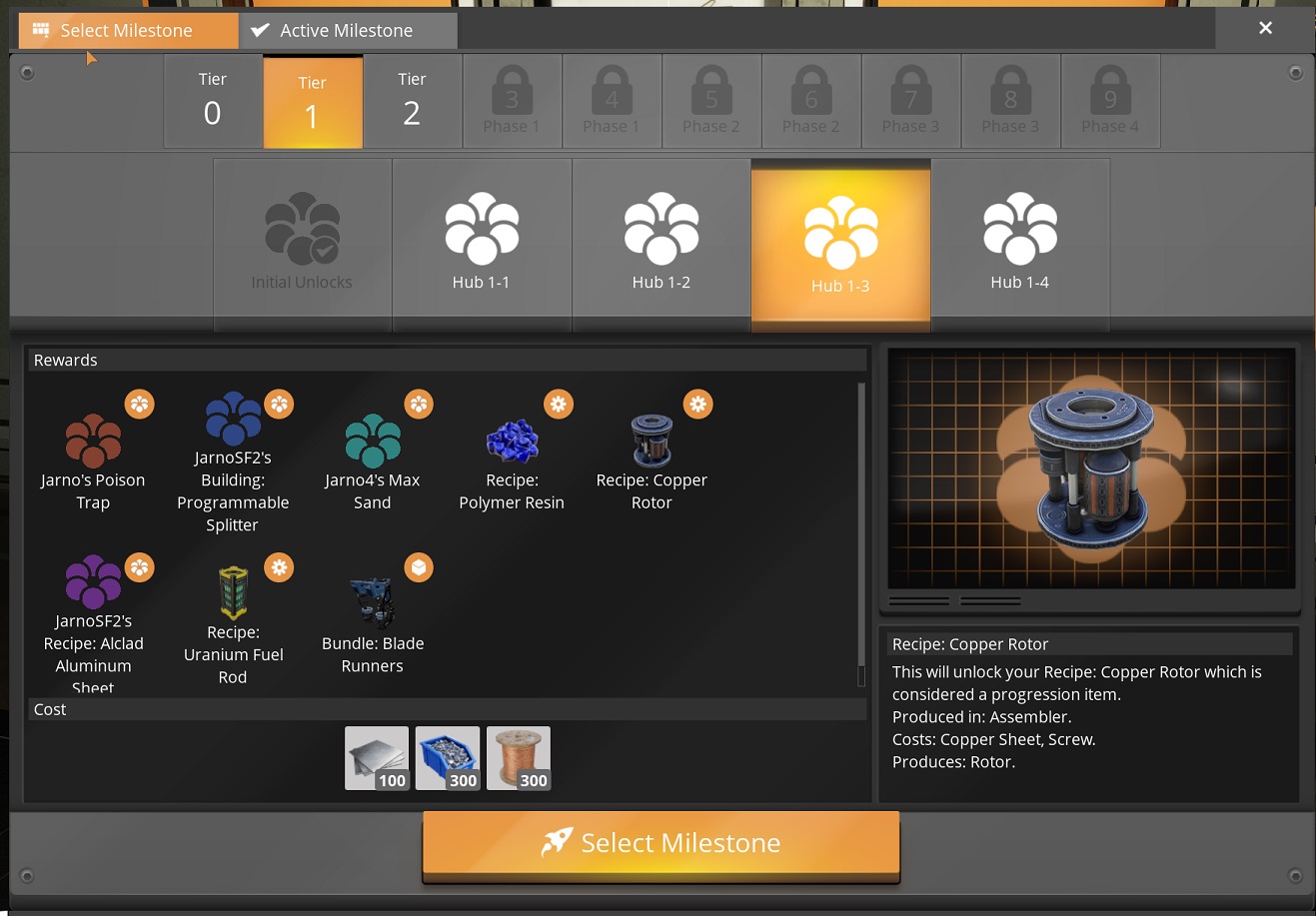
Upon successful unlock of the technology, the item will be sent to its home world.
When the pioneer receives an item, what happens?
When the player receives a technology, it is instantly unlocked and able to be crafted or constructed. A message will appear in the chat to notify the player, and if free samples are enabled the player may also receive some items delivered directly to their inventory. Bundles will instantly be added to the Archipelago Portal network and can be collected at any Archipelago Portal.
What is EnergyLink?
EnergyLink is an energy storage supported by certain games that is shared across all worlds in a multiworld. In Satisfactory, if enabled in the player settings, all base-game Power Storage buildings will act as Energy Link interfaces. They will deposit surplus produced energy and draw energy from the shared storage when needed.
Just like the base game, there is no limit to the discharge/draw rate of one building, and each Power Storage provides TODO MW of charging throughput. The shared storage has unlimited capacity, but TODO% of energy is lost during depositing. The amount of energy currently in the shared storage is displayed in the Archipelago client and appears in the Power Storage building UI.
What is the Archipelago Portal?
The Archipelago Portal is a building that serves multiple purposes:
- Collecting received "Resource Bundle"-type items.
- Transfering items within your Satisfactory world
- Transfering items between multiple Satisfactory worlds
- Gifting items to other games that support the Archipelago Gifting system.
The building requires power to operate. You can build multiple portals or use faster belts to increase their bandwith. However, they currently have no filtering capabilities, so you must deal with this problem when handling their output items.
What is a Trap?
You can optionally enable that some Traps be mixed into the item pool. Traps are items that will instantly trigger some sort of surprise on the player when received. Their severity varies from annoyance to killing the player. A few traps are included in the default options.
Where do I run Archipelago commands?
You can use the game's build-in chat menu.
Check the game's keybinding options to see how to open it.
Run the /help command to list all available commands.
Note that Archipelago commands are not prefixed with ! inside of Satisfactory.
Note that multiple base-game bugs affect the chat menu's functionality and Archipelago can put a lot of info into the chat. You may wish to launch the Archipelago Text Client and use it to run commands instead of the game's chat.
Multiplayer and Dedicated Servers
It is possible to host a Satisfactory Archipelago Slot using the game's built in host-and-play multiplayer, allowing other Satisfactory players to join in constructing your factory. This experience is wonderfull - but there are few things not yet properly working for multiplayer
- Death-links do not kill clients
- Starting inventory for clients is missing Remember that client players must have the same mods installed as the host player to join, however, they do not need to configure Archipelago connection settings.
Dedicated server support is only working for windows at the moment.
Additional Mods
It is possible to load other Satisfactory mods in tandem with the Archipelago Satisfactory mod. However, no guarantee is made that any mods except the "Certified Compatible Mods" listed below will work correctly, especially if they affect game progression, recipes, or add unlocks to base-game technologies.
Content added by unaffiliated mods may end up inaccessible based on your chosen slot settings, for example, its milestones could be in a tier that is after your goal. You may be able to write patches using ContentLib to adjust other mods to work with your slot settings, but doing so is out of the scope of this guide.
Use unaffiliated mods at your own risk, support will not be offered.
The following mods are required dependencies of the Archipelago mod and will automatically be installed for you when you install it using the Satisfactory Mod Manager:
- ContentLib - Runtime content generation.
- Free Samples - Used to implement the Free Samples options. Even if you don't have this game option enabled, the mod will still be present, but its functionality will be disabled.
- MAM Enhancer - Allows viewing MAM research nodes in detail. Enables you to hover over the items/unlocks of a node to see more info, especially important when their names get long.
- FixClientResourceSinkPoints - Fixes a bug where AWESOME Sink points values aren't loaded properly on multiplayer clients.
Certified Compatible Mods
The following mods are known to work with Archipelago:
- The FICSIT Information Tool - View how many Sink Points items are worth and how points-profitable recipes are. Helpful for the AWESOME Points goal.
- Faster Manual Crafting Redux - Reduce the early game manual crafting grind with a manual crafting speed that ramps up as you craft larger batches at once.